
OpenStack Client Tools OVA
Posted: November 2, 2016 Filed under: Tid-bits, VMware | Tags: client tools ova, openstack, openstack client ova, openstack client tools, openstack client tools ova, openstack ova, openstack-client, vio, vmware integrated openstack 4 Comments
I was looking for an OVA the other day that already had most of the common OpenStack API tools or packages already installed. I couldn’t find any so I created one myself.
Download the 1GB OVA (from Google Drive)
Details on the OVA below
Ubuntu 16.04
vmx-10 virtual hardware (5.5 Update 2)
2 vCPU
2 GB RAM

Username: openstack
Password: Netelligent1!

Networking: DHCP

Packages installed:
VMware Tools
OpenSSH server
pip package manager
curl

OpenStack Clients:
python-novaclient
python-cinderclient
python-keystoneclient
python-glanceclient
python-heatclient
python-neutronclient
python-swiftclient
openstacksdk
Free eBook: How to Build a NetApp ONTAP 9 Lab
Posted: October 12, 2016 Filed under: Uncategorized 1 CommentI was fortunate enough to be contacted recently by this excellent fellow, Neil Anderson, to help spread the good word about his new eBook, How to Build a NetApp ONTAP 9 Lab for Free! I took a look at it and it’s definitely the best guide I’ve come across so far for building a lab with a NetApp simulator. He walks you through step-by-step, with lots of screenshots, how to build a lab with
- 3 NetApp clustered Data ONTAP 9 (now just ONTAP 9) simulators
- 2 Windows VMs
- 2 Linux VMs
- Active Directory and DNS
- A VyOS virtual router
- Putty and SuperPutty
- as well as the install of VMware Workstation Player (the free version of the full blown VMware Workstation)
Each item can be downloaded as a trial or evaluation version or is free to use outright which means this lab is a lot like free beer. If you’re studying for NetApp certs, Neil’s free eBook is hard to beat.
The lab topology is shown below.

Check out the rest of Neil’s site while you’re there. It’s chock full of tech goodness, and heavy on NetApp right now.
Small Change to Cisco UCS Manual Upgrades
Posted: June 29, 2015 Filed under: Cisco UCS | Tags: clear startup version, CSCus73964, default infrastructure pack, failed start activation Manual upgrade/activation is disallowed because the Default Infrastructure Policy Startup Version is set Retry the operation after changing the version to Not Set, startup version 8 CommentsI was performing my first upgrade past 2.2(3) this weekend (upgrading to 2.2(5)) and I came across a small change that took some googling to figure out. Eventually, I found the resolution in the Release Notes. If you’re performing a manual upgrade to 2.2(4b) or later, you have to clear the Startup Version of the Default Infrastructure Pack. This action is the result of bug fix CSCus73964 and can be found in the Behavior Changes section of the 2.2 Release Notes.
The error occurred when trying to Activate the firmware of the IO Modules. It states, “Failed start activation. Manual upgrade/activation is disallowed because the Default Infrastructure Policy ‘Startup Version’ is set. Retry the operation after changing the version to ‘Not Set.'”
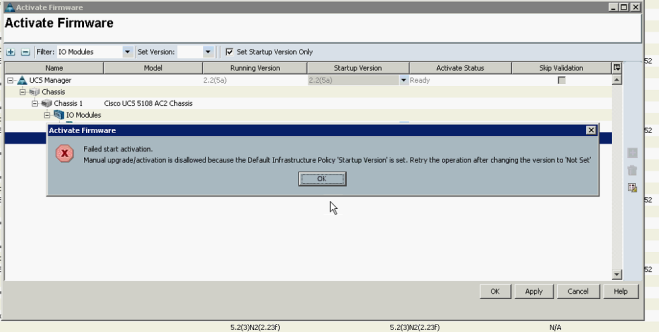
The UCSM GUI option to clear the startup version on the Auto Install tab was grayed out so I couldn’t clear it from there. The Firmware Management CLI Guide offered the CLI solution to clearing it, though, and it worked fine.
Recent Cisco UCS Enhancements
Posted: June 17, 2015 Filed under: Cisco UCS | Tags: 2.2, 2.2(4), 2.2(5), cisco ucs, fabric interconnect traffic evacuation, per fabric interconnect chassis reacknowledgement, release notes, server packs, ucs, ucs server pack, ucs server packs Leave a comment Reading the release notes is always a good idea – but boring. But I perked up today when I was perusing the latest release notes for 2.2(5) for an upcoming implementation. Here are a few items I think are mentionable. Note that all these features were released in 2.2(4).
Server Packs
Clearly I didn’t deploy any UCS’s around the time that 2.2(4) was released because I totally missed this feature. In the distant IT past (pre 2.1 days), both the Infrastructure and Server firmware had to be at the same level to stay in support. Then came 2.1 which introduced backward compatibility with older Server firmware. Now you’re not necessarily forced to upgrade your blade firmware at the same time as your Infrastructure firmware. Nice. Now with 2.2(4) and Server Packs, blade firmware is backward compatible with Infrastructure firmware. Even better. Of course, this comes with caveats. That being that this feature starts at 2.2(4). So at this point, only 2.2(4) and 2.2(5) support such a configuration. But this is cool. Below is the latest mixed firmware version table from the release notes.
Read the rest of this entry »
Day Against DRM 2015 Campaign
Posted: May 6, 2015 Filed under: Book Reviews, Tid-bits | Tags: drm free, packt, vmware books Leave a comment
We can all appreciate those content creators that are willing to keep their work DRM free. My thought on DRM-free is that, while the content is legally free to share, consumers are encouraged to pay for the content they deem worthwhile and, in doing so, they support the creators of the content and “cast a vote” for more, similar content. One type of content that I’m happy to pay for is technical literature, especially that which focuses on my core competencies, namely VMware technologies, storage, and networking. When I first started in this field, there were very few books from which to build my knowledge base. Today, thanks to publishers like Packt Publishing, there are dozens of relevant books.
To celebrate International Day Against DRM, Packt Publishing, which produces DRM-free eBooks and videos, has a special offer. All their eBooks and videos are on sale for $10 for today only, 6 May, 2015. I have more than two dozen of their books, nearly their whole collection of VMware-related tomes, as a testimony to their usefulness and relevant content. In addition, I even started writing a book for them on vCenter Server Heartbeat before VMware killed the product. If you haven’t read a Packt title yet, I encourage you to take this chance to pick one up on the cheap and give it a read. I’m confident you’ll be back for more.
Full disclosure: Packt Publishing has offered to send me a free eBook of my choice for helping to share this sale today.
How to build Thinstation thin client images and exploring config files – Part II
Posted: February 23, 2015 Filed under: VMware, VMware View | Tags: --ignore-certificate-errors, --type-test, build.conf, chrome kiosk mode, how to configure thinstation, session_0, session_1, thinstation, thinstation.conf, thinstation.conf.buildtime 23 CommentsPart I – How to setup Thinstation 5.3 thin client for use with VMware Horizon View 5
Part II – How to build Thinstation images and exploring config files
Part III – How to add drivers to your Thinstation build
Part IV – How to configure Thinstation and Google Chrome for a true, thin client experience

So if you’ve been following since Part I, you now have a DevStation stood up. You’re now ready to build images that your thin clients can boot from. I didn’t mention it in the first post, but be sure you’ve configured a static IP address on your DevStation. You can do this via the Network Manager GUI interface. Just right-click the network icon in the system tray and select Edit Connections…

This is the IP address you’ll configure on your DHCP server as Option 66, the Boot Server Host Name. My DHCP configuration is shown here. It’s important to realize that Option 67, the Bootfile Name, is relative to the root of the TFTP directory. In the case of the DevStation and PXE booting, it needs to be configured as shown here. The root TFTP directory can be found as a symlink in /var/lib/tftpboot which points to /thinstation/build/boot-images/pxe

So the full path to pxelinux.0 is /thinstation/build/boot-images/pxe/boot/pxelinux/pxelinux.0
Here’s a final note about setup before we get going: make sure you have a DHCP scope configured for your thin clients. Common sense, right? It took me longer than I care to admit because I had placed my thin client in a different subnet than the scopes I had configured. Obviously, once I added a scope for this subnet, my thin client started pulling an IP address.
How to setup Thinstation 5.3 thin client for use with VMware Horizon View 5 – Part I
Posted: February 20, 2015 Filed under: VMware, VMware View | Tags: cheap thin client, free thin client, horizon view thin client, thin client, thinstation, thinstation 5, thinstation 5.3, vmware view thin client 5 Comments
Part I – How to setup Thinstation 5.3 thin client for use with VMware Horizon View 5
Part II – How to build Thinstation images and exploring config files
Part III – How to add drivers to your Thinstation build
Part IV – How to configure Thinstation and Google Chrome for a true, thin client experience
Towards the end of my studying for the VCP5-Desktop exam, I decided to look into using some old laptops and PCs I had lying around as thin clients. Searching the web, I ended up settling on and wresting with Thinstation for a couple days. As one of the few, free, thin client options, Thinstation is probably the most stable and most up to date software available. This post shares the efforts I put into getting it running in my home lab.
You can follow Thinstation documentation in the same way that one can simply walk into Mordor.”
– Mike Brown
My end state goal is to touch the thin client as little as possible before working from a View desktop. So my vision, then, is to PXE boot the end point, let it download the thin client OS, and have it auto-launch a View desktop client. From there, a user could enter credentials and log in.
What’s the idea?
There are a few ways to get Thinstation working in a PXE boot environment. The overall idea, no matter how you go about it, is that you have to use a development station to build the thin client boot image that will be downloaded to your thin client hardware via a PXE boot infrastructure. There are no good materials on the intertubes to follow in a step-by-step fashion for this setup, so here’s my attempt at the first such walkthrough, as far as I can tell.

Useful commands for Cisco Nexus zoning
Posted: February 16, 2015 Filed under: Cisco Nexus, Networking, Storage | Tags: add zones, alias, cisco nexus, device, device-alias, fibre channel, how to add zones to cisco nexus, native, nexus 5k, nexus fc, nexus native fc, zone, zones, zoneset Leave a commentAfter implementing Cisco Nexus 5ks that include native Fibre Channel switching for shops that usually don’t have dedicated SAN guys, I’m often called up sometime later to offer a refresher on how to add zones. I usually share this tidbit via email, but here it is for the internets. These commands are very similar on newer MDS models, as well.
Useful commands for Cisco Nexus zoning
A tale of NetApp and Wireshark discovery
Posted: February 13, 2015 Filed under: NetApp, Networking, Storage | Tags: e0M, interface.blocked, NetApp, netapp packet capture, options interface, pktt, pluralsight, storage vmotion requirements, vmotion requirements, wireshark Leave a comment
–==For those interested, Pluralsight has an excellent video training course called Introduction to Wireshark. I highly recommend Pluralsight as the go-to source for IT video training!==–
I was cleaning up a client’s /etc/rc file yesterday while preparing to move some IP addresses to different interfaces and I noticed they had configured the vMotion network as a VLAN interface on both controllers. This isn’t right because the vMotion network only needs to exist between ESXi hosts – the storage array never touches the traffic. Storage vMotion doesn’t use the vMotion network either. It uses the storage network, whether IP- or FC-based.
I wanted to see if the interface was being used at all and fortunately, NetApp has a command for that. The ifstat command shows the count of frames received and transmitted on any or all interfaces, total bytes for each, and the number of multicasts or broadcasts. So in this case, it looked something like:
NETAPP-A> ifstat VIF-A-79

-- interface  VIF-A-79  (22 hours, 57 minutes, 50 seconds) --

RECEIVE
 Total frames:      150k | Total bytes:     10924k | Multi/broadcast: 21869
TRANSMIT
 Total frames:     4767k | Total bytes:      7177m | Multi/broadcast:   138
 Queue overflows:     0
DEVICE
 Vlan ID:            79  | Phy Iface:        VIF-A
Using PowerShell to prevent thinly provisioned NetApp LUNs from going offline – Part I
Posted: November 28, 2014 Filed under: NetApp, PowerShell / PowerCLI, Storage | Tags: autogrow, autosize, fractional reserve, lun, lun offline, luns, NetApp, netapp best practices, netapp powershell, netapp powershell toolkit, netapp toolkit, no space, nospc, powershell toolkit, snap autodelete, snapshot autodelete, vol best practices, volume, volume best practices 1 CommentHappy Day-after Thanksgiving dear readers! I hope everyone is as satisfyingly full on food, friends, and family as I am. As an early gift to myself, I’m writing a PowerShell script that utilizes NetApp’s PowerShell Toolkit. The script will help me quickly determine current volume and LUN settings so I can see what LUNs are at risk of going offline due to out of space conditions. In scripting tradition, I couldn’t find anything online that did exactly what I wanted so I rolled my own!
Here’s what the output looks like. The column names are abbreviated because I expect to have several more columns. The abbreviations are, Volume Thin Provisioning, Fractional Reserve, Snapshots, Volume AutoGrow, Snapshot AutoDelete.



 VirtuallyMikeBrown