
SnapMirror: replication.dst.err:error
Posted: May 14, 2013 Filed under: NetApp | Tags: cannot create incremental snapshot: No space left on device, destination transfer from, process was aborted, replication.dst.err:error, snapmirror 3 CommentsI ran across an issue today that my various sources of troubleshooting (ok, Google) couldn’t help solve – at least not directly. I configured SnapMirror between two disparate systems for a data migration. 16 of the 17 volumes initialized just fine, but I was getting an error on the one volume that had a LUN inside. It was a SnapDrive for Windows LUN, so I knew that just prior to the final cutover I’d have to take a Snapshot via SnapDrive, but I should be able to start the baseline transfer via the standard CLI. Here’s what I was seeing:
 ControllerA> snapmirror initialize -S ControllerZ-vif01:vol_server2008 ControllerA:vol_server2008
Transfer started.
Monitor progress with 'snapmirror status' or the snapmirror log.
Mon May 13 14:21:26 CDT [ControllerA:replication.dst.err:error]: SnapMirror: destination transfer from ControllerZ-vif01:vol_server2008 to vol_server2008 : process was aborted.
Book Review: Instant VMware vCloud Starter
Posted: April 28, 2013 Filed under: Book Reviews | Tags: packt publishing vcloud director, packt vcloud, vcloud book, vcloud books, vcloud starter, vmware vcloud book, vmware vcloud books 1 CommentFull disclosure: Packt Publishing gave me a free copy of the book in order to review it.
So before receiving this book, I hadn’t taken the time to get cozy with vCloud Director. It was on my  list of things to do. Quite honestly, I knew I would be left with Google to find my way with vCD. Fortunately, Packt offered up this gem just in time. This is the first time I’d read one of Packt’s “Instant Starter” books. I didn’t know exactly what to expect but I ended up pleasantly surprised. The book reads a lot like installation notes, like those one would create at work, only better. There are good screenshots throughout as well as explanations of each component. It’s as if the author walks you up to a summit, points to interesting objects on the horizon, then encourages you to explore them on your own. This is the first type of book I’ve read like this. It gets you up and running but leaves many features untouched, but gives you explicit exercises to perform afterward. So it’s almost like a teaser, in that it gives you a taste of vCloud, a slice, but leaves the rest of the pie for you to finish later. I used it to get my vCloud environment running in Workstation in no time. I’ll admit, though, that I was left with wanting more. I had to keep reminding myself of the intention of the author – it wasn’t to walk through every installation and certainly not every configuration piece. It was to bring the reader to a certain point, then let them discover the rest on their own. So in that light, this book meets its goal. I’m impressed with this book and am grateful to Packt for letting me review it. Check the book out here: Instant VMware vCloud Starter
Cheers, Mike
Add transparency in Visio 2010, finally
Posted: April 16, 2013 Filed under: Tid-bits | Tags: fill, fill transparent, format shape, line transparent, transparency, transparent, visio, visio 2010 8 CommentsIf your normal Right-click > Format > Fill… doesn’t work to add transparency to a Visio object in 2010, try setting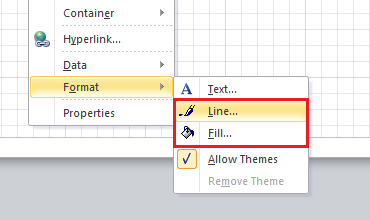 the same percentage for both Fill and Line. In my quick testing, it didn’t work with some objects. I’ve been looking for this functionality for a bit and finally found a reference to the workaround here.
How to configure SPAN on a Nexus 55xx
Posted: April 13, 2013 Filed under: Cisco Nexus, Networking | Tags: 5k span, cisco nexus, configure span, how to configure span, Nexus, nexus span, span, switch port analzyer 4 CommentsI’ve recently needed to configure SPAN a couple times in the lab at work to troubleshoot some issues – or at least to see what I could see. It wasn’t exactly glamorous work, but somebody had to do it. Now, I had to look it up the first time because it had probably been a good year since I’d done it. The document I used is here. Well, the second time I needed to configure SPAN was shortly after the first. I was annoyed that I had to look at the same document and skip over all the paragraphs to get to the commands, then sort out the FC ports and other commands I didn’t need. So for my benefit, and perhaps yours, here’s my short and sweet version of how to configure SPAN on a Nexus 5k.
Open Networking Summit 2013
Posted: April 6, 2013 Filed under: Networking | Tags: ons, ons 2013, open networking, open networking summit, sdn, software defined, software defined networking Leave a commentI’d like to take this opportunity to share a message from ONS 2013 as its conference nears.
Software Defined Networking (SDN) is the buzzword on the mind of every player in the networking and telecom ecosystem; promises to revolutionize networking as we know it and will affect service provider networks, cloud networks and enterprise networks.
Open Networking Summit (ONS) 2013 is the premier conference for SDN and Open Flow and has established itself as the leading event to ‘plug-in’ to SDN.
ONS brings together the entire SDN ecosystem, comprised of thought leaders, business leaders, luminaries, creators, researchers, innovators and engineers, to offer the very highest caliber presentations, tutorials, exhibitions, and latest research to enable the SDN community to interact and share ideas.
My OTV Take
Posted: April 1, 2013 Filed under: Cisco Nexus, Networking | Tags: cisco otv, data center interconnect, datacenter interconnect, dci, l2 dci, layer 2 dci, otv 3 CommentsAfter my recent DFW VMUG presentation where I spoke on the topic, a friend emailed me and asked what I thought about OTV.
“You mentioned that you were against OTV. Curious on your take on this, as we are using it across two datacenters using N7K, UCS, NetApp and VMware.”
I’d like to share my response to him here.
Please don’t get me wrong. If one is forced to implement a Layer 2 Data Center Interconnect (DCI), OTV is probably the best solution. Sometimes, L2 connectivity between data centers is a functional requirement – perhaps even a constraint. In these cases, one should look at the benefits and risks of implementing an L2 DCI and then make an informed decision on whether they should continue with such a deployment. Should they choose to deploy OTV, someone needs to accept the risks associated with OTV in its current implementation.
Registration now open: Dallas–Fort Worth VMUG Meeting
Posted: February 27, 2013 Filed under: Tid-bits, VMware | Tags: dfw, dfw vmug, local meeting, user group, users group, vmug, vmug meetings, vmware user group, vmware users group Leave a comment
The DFW VMUG has opened registration for its upcoming local meeting.
Sign up here: http://www.vmug.com/e/in/eid=801&source=5
I’d like to thank our meeting sponsors, Nutanix and Zerto, for helping keep the VMUG alive and kicking.


Yours truly will be giving a short presentation at 12:15 about why I worked *not* to have OTV implemented when the bank I worked for stood up its first DR site. I’ll also speak about VXLAN and why it’s not a L2 Data Center Interconnect. I’m sure you won’t want to miss that…
View the complete agenda for the most up-to-date information. We’ll also hold a vBeers following the meeting, so come and say hi.

My favorite virtualization blogs – oh, and go vote yourself!
Posted: February 24, 2013 Filed under: Tid-bits, VMware | Tags: best blogs, favorite blogs, top blogs, virtualization blogs, vmware blogs 2 Comments
So I just finished voting for my favorite blogs on  Eric Siebert’s vSphere-land.com. This was my second time voting and I’d like to thank Eric for hosting and TrainSignal for their support of Eric’s work. The VMware army of bloggers is definitely strong, having added dozens of new bloggers this past year as well as the best bloggers posting great new content. What I’d like to do here is run down the list of how I voted just to say thanks to those who’ve contributed so much to my personal success these past 12 months.
Of showers and sysstat
Posted: February 20, 2013 Filed under: NetApp, Storage | Tags: flash cache, netapp cpu %, netapp cpu utilization, netapp performance, performance, performance analysis, sysstat Leave a commentI was asked by a client yesterday in passing how to check CPU utilization on one of their NetApp filers. I didn’t immediately know where to go and we quickly moved on to something else. So as I was showering this morning, as I do many mornings, I remembered that, of course, you can use sysstat to view performance data. Anyways, this is a real nice way to view instantaneous general performance data. Options for this command are shown below.
deathstar> sysstat ?
usage: sysstat [-c count] [-s] [-u | -x | -m | -f | -i | -b] [interval]
-c count – the number of iterations to execute
-s – print out summary statistics when done
-u – print out utilization format instead
-x – print out all fields (overrides -u)
-m – print out multiprocessor statistics
-f – print out FCP target statistics
-i – print out iSCSI target statistics
-b – print out SAN statistics
interval – the interval between iterations in seconds, default is 15 seconds
What’s the (SnapMirror) syntax, Kenneth?
Posted: February 19, 2013 Filed under: NetApp, Storage | Tags: /etc/snapmirror.conf, destination filer does not match hostname ignoring line, filer, ignoring line, invalid destination, NetApp, snap mirror, snapmirror, snapmirror.conf 1 CommentI had the opportunity to configure SnapMirror for a client today and it gave me a bit of a headache. I did what I thought was my due diligence: reading the relevant vendor documentation for SnapMirorr for each version of Data ONTAP, 7.3.2 and 8.0.3P3. What I failed to do was read a few lines further than I actually did – I missed a simple piece of syntax that turned a 30 minute WebEx into a 2 hour ordeal. I learned a good lesson about SnapMirror during this engagement, though, and I’d like to share it.
The SnapMirror of these three volumes were actually for a data migration because the source filer is being decommissioned. The general steps required in the engagement today were as follows:
<> Run a cable between what will be the dedicated replication links on each filer
<> Configure each interface with IP settings
<> Ensure SnapMirror is licensed and enabled on each filer
<> Configure /etc/hosts and /etc/snapmirror.allow files on source filer
<> Configure /etc/hosts and /etc/snapmirror.conf files on destination filer
<> Initialize the baseline replicaction



 VirtuallyMikeBrown